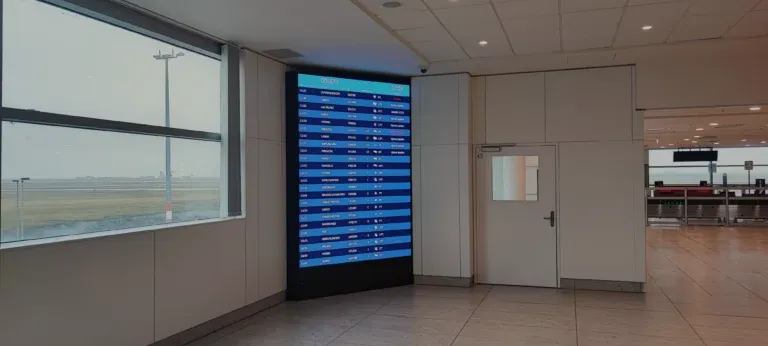
Digital Signage System: What is a touchscreen information kiosk and 5 areas for its use?
Digital Signage System: touchscreen kiosks, their popularity and prevalence have grown significantly not only in business.

A touchscreen information kiosk is a hardware and software complex that includes software for digital screens, aimed at providing various information to users. It is equipped with a touchscreen display that works with a digital signage player and displays navigation menus, mall maps, flight schedules, and other content needed by the user. To obtain the necessary information, it’s enough to touch the relevant area on the screen. Another name for this device is a self-service terminal.
Such a kiosk is simple and intuitive to use. The information on its display can be presented in various formats—graphics, text, video, navigation, multi-level menus. Digital advertising can also be integrated into the operation of such kiosks.
The first prototype of this device was developed and used in 1977, while commercial use began only 8 years later.
Today, touchscreen information kiosks can be found in various public places: shopping and entertainment centers, food service establishments, cinemas, banks, airports, train stations, and stadiums. Thanks to the software for digital screens, these kiosks are a powerful tool for providing information and advertising in modern conditions.
Advantages of touchscreen information kiosks
The popularity and widespread use of such hardware and software systems are explained by numerous advantages.
– Ease of use. The information on the screen is visually presented with the help of a digital signage player. For example, if it’s a café menu, not only a list of available dishes and drinks is displayed, but also their images. Navigation, zooming in on images, flipping through virtual pages—all are done with light finger touches.
– Quick access to information. Unlike paper guides and maps, a touchscreen information kiosk with digital signage software allows obtaining the necessary information with minimal time spent.
– Fast customer service. Costs can be saved by not hiring staff. Kiosks automate routine operations such as flight check-ins and order processing. This also helps reduce queues and waiting times.
– Increased engagement. The user can get additional information, contact a specialist, or see advertising content, including digital ads.
– Increased average transaction value. A customer can calmly place an order, and the system will suggest additional products and services, which can also be integrated through digital advertising.
– Versatility. Touchscreen kiosks can be installed in various public places, and digital advertising is easily alternated with informational content.
Use Digital Signage System in various sectors
Information kiosks can be adapted for different fields to provide users with the specific information they need, utilizing digital signage systems and screens for advertising.
1. Retail:
– product catalog;
– schedule of store promotions;
– list of sales happening in the mall;
– self-service checkout;
– navigation through the store;
– use of virtual models for trying on shoes and clothes.
2. Cafes and restaurants:
– main menu;
– seasonal menu;
– information about promotions;
– option to place orders independently without contacting a cashier.
3. Tourism:
– information about landmarks and interesting routes;
– virtual museum or exhibition tour;
– multimedia guide;
– interactive map with search capabilities for various criteria;
– ticket sales for museums, booking tours.
4. Government institutions:
– access to reference information, such as office hours of a specialist;
– appointment scheduling, tracking electronic queues;
– payment of state duties and fines;
– document processing — submitting applications, checking status.
5. Education:
– publication of class and exam schedules, as well as changes to them;
– access to the school or university’s electronic library;
– interactive models of objects;
– the ability to receive online consultations from a teacher or methodologist.
Choosing and purchasing an information kiosk
Various types of touchscreen information kiosks are available for sale. Before purchasing, it is advisable to create a list of requirements for the devices you plan to use.
Depending on the installation location, all Digital Signage systems of this type are divided into two categories:
– for indoor use;
– for outdoor installation – such models must be protected from moisture, temperature fluctuations, and vandalism.
By installation method, touchscreen kiosks are divided into floor-standing and wall-mounted.
Additionally, when choosing, it’s important to consider:
– Screen diagonal – the larger it is, the bigger the image, but the kiosk size also increases;
– Display resolution – the higher, the better;
– Screen brightness – preferably, it should be high;
– Memory capacity and content update method – via USB or wireless connection;
– Performance of the built-in computer;
– Availability of additional options – this could be a video camera, scanner, printer, integration with various accounting systems;
– Level of protection against dust and moisture, and the presence of shatterproof glass that protects the display.
Recommendations for purchase
We recommend ordering touchscreen information kiosks from companies that specialize in supplying high-quality equipment and offer solutions that meet your specific requirements. Manufacturers providing digital solutions can also handle installation, setup, and maintenance. Choose experienced companies that can offer a project using Digital Signage management and execute it at a high level.
In the modern business environment, a digital signage system plays a critical role in improving communication efficiency. This solution provides the ability to integrate various types of content on screens, allowing companies to flexibly respond to changes in consumer and market needs. With screen management software, businesses can create and update advertising campaigns, informational messages, menus, and other materials without the need for physical intervention.
It is especially important that the software allows centralized content management for a large number of screens located in different locations. This is a major advantage for chain retailers, restaurants, or companies with a wide structure. The ability to quickly and easily update information through screen software helps maintain the relevance and consistency of content across all points of sale.
Digital Signage System also offers the opportunity to implement interactive solutions that increase customer engagement. For example, in shopping malls or at exhibitions, interactive screens can offer virtual tours, product information, or special promotions. This not only improves the user experience but can also increase sales and overall business efficiency.
In the field of education, screen management software helps organize the learning process and communication between teachers and students. Screens can be used to display class schedules, informational announcements, or educational materials. This creates a more interactive environment and simplifies access to important information.
It is also important to note that Digital Signage System supports integration with analytical tools, allowing businesses to track the effectiveness of their campaigns and better understand consumer behavior. Data on how often users interact with the screen, and which messages they view, can be used to optimize content and communication strategies.
With the implementation of new technologies such as artificial intelligence and machine learning, screen management software becomes an even more powerful tool. For instance, screens can automatically adjust content based on real-time data, weather conditions, or user demographics. This enables the creation of more personalized and relevant messages.
Thus, Digital Signage System continues to evolve, becoming an integral part of modern communication strategies. Investing in screen management software not only improves the effectiveness of advertising campaigns but also helps enhance customer service, reduce content management costs, and provide competitive advantages in the market.
Advision — Content Management System for remote management and media planning of video and audio content broadcasting. We help offline businesses and advertising companies automate their workflows and implement a robust Digital Signage infrastructure using our proprietary software and hardware solutions.
Contact us, and we will help you implement the most modern technologies to solve your problems!